
Voice User Interface Design: How to Create Human-Centric Voice Experiences

Update:
April 11, 2026
7 min read

Voice technology has changed the way people interact with digital products. As Voice User Interface Design continues to evolve, it is shaping more natural and intuitive experiences across smart speakers, in-car assistants, banking systems, and healthcare platforms. Yet despite this growth, many voice interactions still feel robotic, confusing, or frustrating for users.

Designing a strong Voice User Interface, or VUI, requires more than writing prompts and connecting intents. It requires understanding how people naturally speak, what they expect from a voice interaction, and how they emotionally respond to tone, timing, and phrasing. A human-centric voice experience is one that feels useful, clear, and natural from the first interaction to the last.

Why Human-Centric Design Matters in Voice Interfaces

Unlike graphical interfaces, voice has no visible navigation menu, button hierarchy, or layout to guide the user. A person must rely entirely on spoken cues, memory, and context. That makes the experience far more sensitive to wording, pacing, and structure.

When voice experiences fail, they usually fail for predictable reasons. The system asks for information without enough context. The prompts sound like written text instead of real speech. The interaction feels like a sequence of commands rather than a conversation. As a result, users become uncertain, repeat themselves, or abandon the task entirely.

A human-centric VUI solves this by focusing on how people actually communicate. It respects the flow of conversation, reduces cognitive effort, and helps users move forward with confidence. Instead of forcing users to adapt to the machine, it adapts the system to the user.

Build a Persona Before You Build Prompts
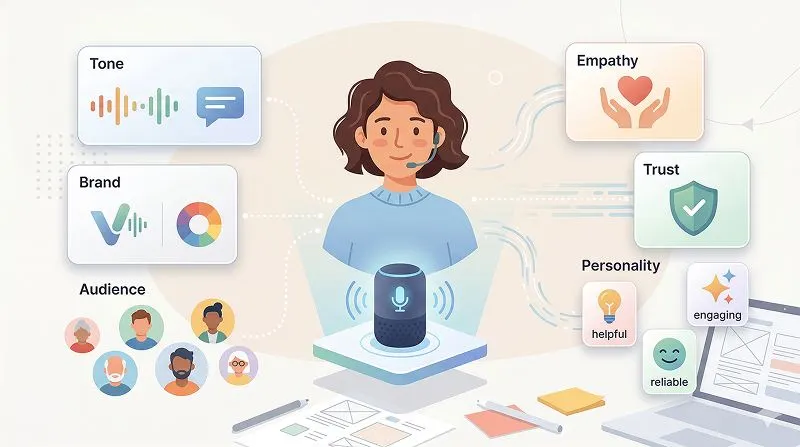
One of the most overlooked aspects of VUI design is persona. Every voice interface communicates a personality, whether the team designs it intentionally or not. The moment users hear a voice, they make assumptions about who is speaking, what role that voice plays, and whether it feels appropriate for the situation. This is a core principle emphasized in the source article’s discussion of persona and user perception.

Define the Role of the Voice

A voice assistant should never sound generic. It should have a clear role in the interaction. Is it acting like a banking assistant, a healthcare guide, a travel helper, or a customer support representative? The role shapes everything from vocabulary and tone to pacing and level of formality.

For example, a financial assistant should sound calm, competent, and precise. A wellness app may sound supportive and warm. A children’s learning tool might be more energetic and playful. The persona should fit the product’s purpose, not simply reflect what sounds pleasant in isolation.

Match Persona to Brand and Audience

A good persona also aligns with brand identity and audience expectations. A voice that works well for one context may feel inappropriate in another. A cheerful, upbeat tone may suit a lifestyle service, but sound insensitive in a medical or insurance scenario. The source article highlights this clearly through the healthcare example, where an overly happy voice felt wrong for users refilling prescriptions.

Designers should therefore consider user demographics, familiarity with the service, usage frequency, and cultural expectations. Human-centric design begins when the voice sounds like it belongs in the user’s world.

Design Conversations, Not Command Menus

Many teams still design voice flows as if they were converting a call tree or a screen-based interface into audio. This is where the experience begins to break. Voice is not just navigation without visuals. It is a living interaction shaped by timing, context, and natural language.

Speak the Way People Speak

A common mistake in VUI design is writing dialogue the way people write, not the way they talk. Real speech is shorter, softer, and more fluid. People use contractions, incomplete sentences, and transitional words. They say, “You’re all set,” not “Your request has been processed.” The source article explicitly argues that effective VUI writing must reflect spoken language rather than written prose.

That difference matters. Written language often feels stiff when spoken aloud. Human conversation, by contrast, relies on rhythm and familiarity. Prompts should sound natural when read out loud, not just look polished on a document.

Use Context to Move the User Forward

Conversation is not linear in the same way as a flowchart. People do not think in menus. They think in goals. They want to pay a bill, change an appointment, or check an order. A human-centric VUI should therefore guide them forward based on their intent, not trap them in backward-facing system logic.

Instead of saying, “If you want to return to the main menu, press 1,” a better system restates the available next step in plain language. It helps users recover naturally and keeps the interaction progressing. This forward-moving conversational principle is one of the strongest design lessons from the source text.

Prototype with Sample Dialogues
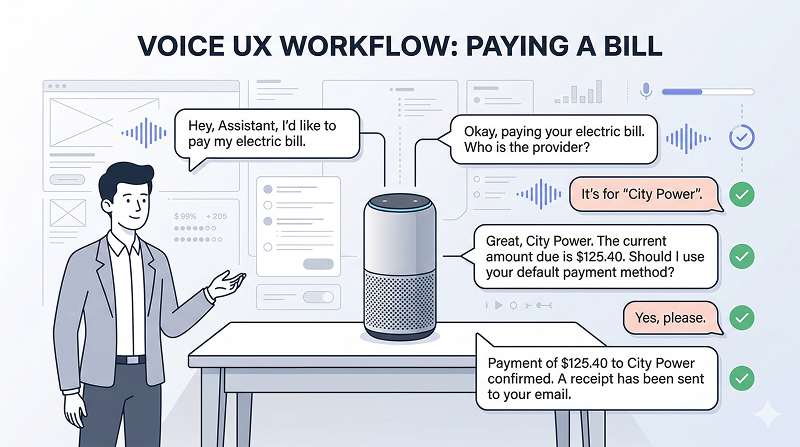
In VUI design, sample dialogues are the equivalent of wireframes. Before building a full system, teams should write realistic scenarios that show how the interaction unfolds between the user and the system.

Start with User Stories

Begin by identifying key user goals. Why is the user speaking to the system? What are they trying to accomplish in that moment? Once those scenarios are defined, write dialogues that simulate real-world usage. The goal is not to create a perfect script. It is to test whether the conversation feels intuitive, efficient, and believable.

Write for the Happy Path and the Messy Path

A good sample dialogue should cover both the ideal experience and the imperfect one. The happy path shows smooth task completion. The messy path shows interruptions, vague answers, corrections, and misunderstandings. The source article reinforces that VUI design must include not only successful flows, but also out-of-context input and progressive error scenarios.

When designers prototype both, they create a system that feels resilient rather than fragile.

Make Error Handling Feel Cooperative

In voice design, errors are not just technical failures. They are moments of relationship-building. A bad error message can make the system feel rigid or blaming. A good one can reduce frustration and restore clarity.

Use Escalation Instead of Repetition

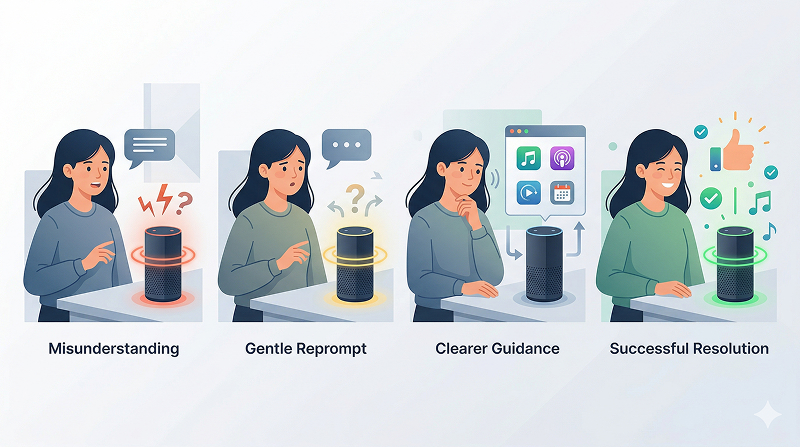
If the system does not understand the user, repeating the same prompt word for word is rarely helpful. A better approach is escalation. Start with a light reprompt such as, “Sorry, could you say that again?” If confusion continues, provide a more specific instruction. This escalation model is directly described in the source article as a practical way to support both new users and experienced users efficiently.

Follow Cooperative Communication Principles

Human-centered error design should also follow clear conversational principles: give enough information, be truthful, stay relevant, and avoid ambiguity. These ideas mirror the cooperative approach discussed in the source through Grice’s Maxims.

When users feel that the system is trying to help rather than correct them, trust increases. And in voice experiences, trust is everything.

Conclusion

Creating human-centric voice experiences is not about making systems sound more impressive. It is about making them sound more human, more relevant, and more useful. The best VUI design comes from understanding that people do not want to memorize commands. They want to speak naturally, feel understood, and complete tasks without friction.

A successful voice interface begins with the right persona, continues with conversational structure, and becomes memorable through clarity, empathy, and cooperative error handling. When designers focus on real speech and real user context, voice stops feeling like a machine and starts feeling like a meaningful experience.


Frequently Asked Questions

What is voice user interface design?

Voice User Interface (VUI) design is a technology that allows users to interact with devices or systems through spoken language. Unlike traditional graphical user interfaces (GUI), which rely on screens, buttons, and other visual elements, VUI enables communication between humans and machines using voice commands and responses. It is based on speech recognition technology, which allows devices to interpret and process human speech.

At the core of VUI design is speech recognition, which converts spoken words into digital input that the system can understand. The system then processes this input to perform specific tasks, such as retrieving information, controlling devices, or making transactions. In addition to speech recognition, VUI also often includes natural language processing (NLP), which helps the system understand the meaning of the words spoken, including context and intent.

Key elements of VUI design include:

  1. Speech Recognition: This is the technology that translates spoken words into text. It involves acoustic models, language models, and signal processing techniques to accurately interpret what a user says.
  2. Natural Language Processing (NLP): After speech is converted to text, NLP helps the system understand the structure and meaning of the sentences. This allows for more sophisticated interactions, where the system doesn’t just follow direct commands but can also understand context, nuances, and even indirect requests.
  3. Voice Feedback: In addition to receiving spoken commands, VUI systems provide auditory responses. These can be pre-recorded or dynamically generated. Proper voice feedback is crucial for user experience, as it lets users know the system has understood their request and is performing the task.
  4. Voice Command Structure: For VUI to be effective, the design of voice commands needs to be intuitive. It often involves creating a command set that allows users to naturally interact with the system without requiring specific or rigid phrasing. VUI design needs to anticipate the variety of ways people may phrase a command or question.
  5. User Experience (UX) and Usability: Just like in any interface design, usability is a key consideration. For VUI, this means designing prompts and feedback that are clear, concise, and responsive. It’s essential that users can easily understand the system’s capabilities and limitations. Additionally, VUI systems must be capable of handling miscommunication or errors, providing users with guidance or clarification when needed.
  6. Context Awareness: Modern VUI systems also aim to incorporate context into their interactions. This means the system can understand not just the specific words, but also the environment in which they are spoken. For example, if a user says “Turn off the lights,” the system should know which lights to turn off if there are multiple options.
  7. Integration with Other Systems: VUI is often part of larger ecosystems, such as smart homes or virtual assistants (e.g., Amazon Alexa, Google Assistant, Apple Siri). These systems allow for integration with various devices and services, enabling users to control multiple aspects of their environment via voice, such as adjusting the thermostat, playing music, or ordering groceries.

The development of VUI has transformed the way users interact with technology, especially in contexts where hands-free control is needed, such as driving, cooking, or accessibility for people with disabilities. Effective VUI design considers the unique challenges of voice-based communication, such as ensuring clarity in noisy environments, making commands intuitive, and managing multiple languages or accents.

In conclusion, voice user interface design revolves around creating seamless, efficient, and natural interactions between users and devices through voice. It requires a combination of speech recognition, natural language understanding, thoughtful feedback design, and an understanding of user needs to create intuitive, effective, and accessible systems.

At first glance, the main difference between GUI (Graphical User Interface) and VUI (Voice User Interface) lies in the medium of interaction. In a GUI, users interact with a system through visual elements such as buttons, icons, menus, and text fields, using tools like a keyboard, mouse, or touchscreen. In contrast, a VUI allows users to interact with a system through spoken language. Instead of clicking, tapping, or typing, users simply speak commands or questions, and the system responds through voice, text, or actions.

However, the difference between GUI and VUI is much deeper than just the input method. The most fundamental difference is the interaction model. GUI is based on a visual and spatial model, where users can see available options on a screen and choose from them directly. This makes GUI highly structured, easy to navigate, and suitable for tasks that involve browsing, comparing, editing, or multitasking. Users can also go back, review information, and make decisions based on what is displayed visually.

On the other hand, VUI is based on a conversational model. It works more like human communication, where users express their needs through speech and expect the system to understand their intent. In VUI, options are not always visible at once. Users often need to remember commands or rely on prompts from the system. Because of this, VUI must be designed carefully to make conversations natural, efficient, and easy to follow. The system should be able to recognize speech accurately, understand meaning, handle different ways of speaking, and provide clear feedback.

Another important difference is how information is delivered. GUI presents information visually and often all at once, which is useful for complex tasks. VUI delivers information sequentially through audio, so users receive one piece of information at a time. This makes VUI convenient for hands-free use, such as while driving, cooking, or using smart home devices, but it can also make complex tasks slower or harder if too much information is spoken at once.

In terms of usability, GUI is usually better for tasks that require precision, visual detail, and multiple choices. VUI is more effective for simple commands, quick actions, and accessibility support, especially for users with visual impairments or those who cannot easily use screens or keyboards.

In conclusion, GUI and VUI differ not only in the tools used for interaction, but also in the way users think, communicate, and complete tasks within the system. GUI relies on visual navigation and direct manipulation, while VUI relies on spoken conversation and language understanding. Both interfaces have their strengths, and the choice between them depends on the user’s needs, context, and task complexity.

Yes, ChatGPT can help create UI design, but its role is mainly as an AI assistant that supports the design process rather than a complete replacement for professional design tools. ChatGPT can generate UI ideas, suggest layouts, create wireframe descriptions, write design specifications, and produce frontend code such as HTML, CSS, and React components. OpenAI also provides tools for building interactive UI experiences, including the Apps SDK for creating UI components inside ChatGPT, as well as workflows that connect AI-assisted coding with design tools such as Figma.

In practice, this means ChatGPT is useful for speeding up UI design work. A designer or developer can describe the screen they want, such as a login page, dashboard, checkout flow, or mobile menu, and ChatGPT can generate a first draft of the structure and code. This helps teams move faster from concept to prototype, especially in the early stages of product design. However, the final quality still depends on human review, design judgment, usability testing, and alignment with the product’s design system.

With UXPin Merge, the process becomes more practical because AI support is built directly into the editor. UXPin explains that its AI Component Creator and Merge AI allow users to enter prompts inside the design environment to generate code-backed UI components. These components can follow popular libraries such as MUI, Bootstrap, Ant Design, Tailwind UI, and shadcn/ui. For custom design systems, UXPin also supports connecting a Git repository so the generated UI matches real coded components used by the team. This means users do not need to go separately to OpenAI’s website to ask for UI help, because the workflow is integrated into UXPin’s editor.

So, the best conclusion is this: ChatGPT can help create UI design, generate components, and accelerate prototyping, while tools like UXPin Merge make that capability more usable in a real design workflow by embedding AI directly into the editor. ChatGPT provides the intelligence and generation support, while UXPin provides the structured environment for designing, editing, and testing UI with code-backed components.

In game UI design, there are four main types of user interface representation: diegetic, non-diegetic, spatial, and meta. These categories explain how interface elements appear in the game world and how players experience them during gameplay. Understanding these four types is essential for creating a game interface that is functional, immersive, and easy to use.

Diegetic UI refers to interface elements that exist directly within the game world and are visible to the characters as well as the player. In other words, the UI is part of the story environment itself. For example, a health indicator shown on a character’s suit, a map displayed on an in-game device, or a holographic screen inside the world can all be considered diegetic UI. This type of interface helps strengthen immersion because it feels like a natural part of the game universe.

Non-diegetic UI is the opposite. It includes interface elements that are only visible to the player and do not exist in the game world for the characters. Common examples include health bars, score counters, mini maps, inventory menus, and pause screens. This type of UI is widely used because it presents information clearly and efficiently. Although it may reduce realism slightly, it improves usability and helps players make decisions quickly.

Spatial UI is placed within the 3D game space but is mainly intended for the player rather than as a natural object in the story world. It often appears attached to characters, objects, or locations. For example, a name tag floating above a character, an interaction prompt near a door, or a marker showing where the next objective is located can be categorized as spatial UI. This type helps connect the player to the environment while still guiding attention and interaction.

Meta UI represents interface effects that communicate a player’s condition or experience indirectly, often through screen-based visual feedback. Examples include a red flash when the player takes damage, blurred vision when the character is weak, blood splatter on the screen, or distortion effects during fear or confusion. Meta UI is often used to create emotional impact and make gameplay feel more intense without relying only on standard menus or icons.

To become a strong game UI designer, it is important to understand not only the meaning of these four types, but also when and how to use them effectively. A good game interface often combines these types to balance clarity, immersion, and player experience. Diegetic and spatial UI can increase realism, while non-diegetic and meta UI can improve communication and emotional response.

In conclusion, the four types of UI in game design are different ways of presenting information to the player. Each type serves a different purpose, and the best game interfaces use them strategically to support both gameplay and storytelling.

user 1
Author

With over 5 years of experience in web development, I create visually appealing, user-friendly websites optimized for performance and SEO. Specializing in UI/UX design, front-end development, and WordPress, I deliver custom solutions that align with your brand’s goals, ensuring a seamless online experience that drives engagement and growth. Let’s collaborate to bring your vision to life with a website that works for you.

Share On

Interested working wIth me ?