

The core idea behind the twelve-factor app config environment variables pattern is simple: every piece of configuration that changes between deploys must live outside your code and be injected via the environment. In practice, most teams think they are doing this, but subtle mistakes in how they structure and load env vars quietly break the principle and make their apps fragile.
Learn more about: How to Classify Software Applications Components
TL;DR
- Config is anything that can vary between deploys: URLs, credentials, feature flags, and limits.
- The most common mistake is mixing config with code via defaults, shared files, or per-environment branches.
- Proper use of environment variables means strict separation, one source of truth, and no hidden fallbacks.
- Secret management, typed validation, and consistent naming are critical for reliability and security.
- Fixing your config model early pays off in safer deployments, easier scaling, and simpler debugging.
What Does “Config” Really Mean in Twelve‑Factor Apps?
Config as everything that changes between deploys
In the Twelve-Factor App methodology, config is every setting that differs between environments but should not require a code change. That includes API keys, database URLs, message broker endpoints, log levels, feature flags, and even things like per-region timeouts or rate limits. Based on experience, teams often underestimate this and only move “obvious” secrets out, leaving things like service URLs or feature toggles buried in code.
The guideline is: if you ever say “in staging we use X, in production we use Y,” that value belongs in config. According to industry standards, this separation is what lets the same build artifact run unchanged across dev, test, staging, and production. When we treat these values as data, not logic, we can promote a single image or binary through environments by only changing the environment variables around it.
Why environment variables are the preferred mechanism
Environment variables are the recommended delivery mechanism because they are ubiquitous across operating systems, containers, and PaaS platforms. Research on cloud-native practices shows that env vars are easier to inject at deploy time than editing files inside the app image. They also integrate cleanly with orchestrators like Kubernetes and platforms like Heroku or serverless runtimes.
A common real-world example is a Node.js or Python service running in Docker, where ops teams provide configuration via `ENV` directives or container runtime flags. This keeps the image generic while each deployment environment supplies its own values. The twelve-factor app config environment variables pattern builds on this universality to keep your code portable and environment-agnostic.
What Is the #1 Config Mistake Teams Make With Environment Variables?
Mixing config with code through defaults and conditionals
The most common mistake is believing “we use environment variables” while still baking assumptions into code. This happens when developers hardcode default URLs, API keys, or credentials that are only overridden if an env var exists. In practice, that means your app has two sources of truth: the environment and the code, which violates the principle and confuses debugging.
A real example I’ve seen: `DATABASE_URL` is optional, and if missing, the code silently falls back to `localhost` with a shared password. This works in development, but in production a missing env var points to the wrong database or fails in non-obvious ways. According to experts, silent fallbacks are one of the biggest reliability anti-patterns in config handling.
Splitting config across files, branches, and builds
Another frequent issue is scattering configuration across multiple per-environment files or even separate branches. Teams keep `config.dev.json`, `config.prod.json`, or maintain “prod-only” branches with slightly different constants. This breaks the idea that the same build should run in all environments by just changing environment variables.
The cost shows up later: hotfixes applied to one branch but not another, or inconsistencies where staging behaves differently from production even with the same env vars. Industry best practices recommend a single codebase and a single artifact, with configuration injected from the outside. If you need different values, that’s a job for env vars or external config stores, not conditional code paths.
Hiding secrets in code or shared repos
A third major mistake is storing “temporary” secrets in the codebase, config files, or shared wikis. Developers often justify this with “it’s just for staging” or “it’s only for local testing.” Based on experience, those temporary hacks almost always become permanent, leading to leaked credentials and emergency rotations.
Security reports repeatedly show that exposed API keys and tokens in repositories are a top source of breaches. The correct approach is to treat all secrets as config, managed via environment variables or dedicated secret managers, never committed to version control. Even for internal tools, the risk and cleanup cost are not worth the shortcut.
How Do You Implement Config via Environment Variables Correctly?
Start with a strict definition and a single source of truth
A robust implementation begins by defining config broadly and centralizing how you load it. Every value that can vary per environment must come from an external source, typically environment variables, and your app should fail fast if required values are missing. This “fail on startup” behavior is a hallmark of well-designed twelve-factor apps.
In practice, we usually create a small config module that reads env vars once at startup, validates types and ranges, and exports a typed configuration object. Tools like `dotenv` for Node.js, `python-dotenv` for Python, or Spring Boot’s config system help load values, but the validation and “no silent defaults” policy are up to you. The goal is to avoid ad-hoc `process.env.X` calls scattered across the codebase.
Use modern tooling for secrets and environment management
Modern platforms provide multiple ways to manage configuration outside your code. Kubernetes offers ConfigMaps and Secrets, AWS has Systems Manager Parameter Store and Secrets Manager, and platforms like Heroku or Render expose a simple env var UI and API. For multi-service systems, a centralized configuration service can reduce duplication and drift.
A practical pattern is: store non-sensitive values directly as env vars and sensitive ones in a secret manager, then inject them as env vars at runtime. This keeps your deployment model consistent while improving security posture. Worth noting: you should still treat all env vars as potentially sensitive in logs and debugging tools, especially in shared environments.
Name, document, and version your configuration
Good config hygiene also includes consistent naming, clear documentation, and versioning. According to experts, descriptive and stable env var names reduce misconfiguration incidents dramatically. Avoid cryptic names like `CFG1`; instead, use `PAYMENTS_API_BASE_URL` or `AUTH_TOKEN_TTL_SECONDS`.
In many teams I’ve worked with, a simple configuration reference document or README section listing each env var, its purpose, type, and default (if any) prevents a lot of deployment surprises. When you introduce a new variable, treat it like a code change: document it, review it, and ensure backward compatibility where needed. This discipline keeps your config surface understandable as the application grows.
Learn more about: User Registration Success Message
What Does a Good Twelve‑Factor Config Setup Look Like in Practice?
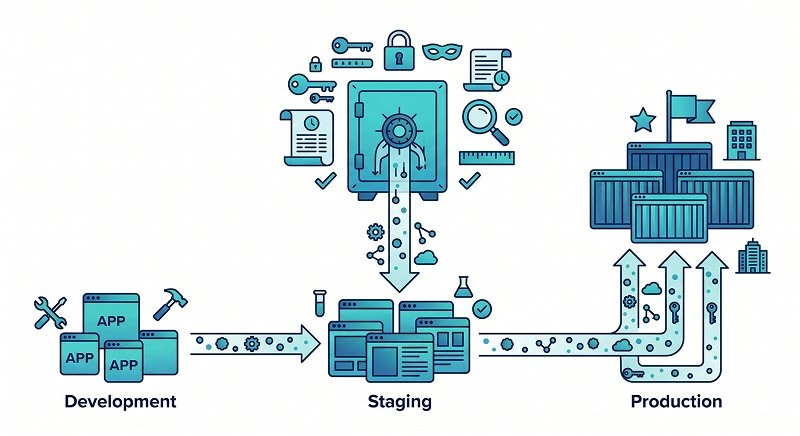
A concrete multi-environment scenario
Consider a simple payments service used in three environments: local development, staging, and production. It talks to a PostgreSQL database, a third-party payments API, and an internal user service. A naive implementation might hardcode the dev database URL and only use env vars for production, or embed the sandbox API key directly in code “for convenience.”
A twelve-factor aligned setup instead defines env vars like `DATABASE_URL`, `PAYMENTS_API_BASE_URL`, `PAYMENTS_API_KEY`, and `USER_SERVICE_URL` for all environments. For local development, a `.env` file or dev container config sets these values; for staging and production, your orchestrator or platform injects them securely. The same Docker image or binary runs in all three environments, with only the environment variables changing.
Avoiding hardcoding, coupling, and hidden assumptions
By externalizing all environment-specific values, you avoid coupling your app to any particular infrastructure. If you move from one cloud provider to another, or from a managed database to a self-hosted one, you only change env vars, not code. This is particularly important for teams practicing continuous delivery, where quick environment changes are common.
A common real-world example is rotating an API key or switching to a new payment provider. With proper config handling, you can deploy the change by updating environment variables and restarting services, often without a new build. Without it, you end up with emergency patches, rushed code changes, and increased risk of outages during transitions.
Testing and observability for configuration
A strong setup also includes tests and observability around configuration. Unit tests can verify that your config module rejects invalid or missing env vars. Integration tests can run with different env var sets to simulate staging or production behavior. This helps catch misconfigurations before they reach users.
From an observability perspective, it is helpful to log which configuration version or profile is active, without exposing actual secret values. For example, logging that `PAYMENTS_API_BASE_URL` points to a sandbox domain can quickly explain why a staging environment behaves differently. Just be careful not to log sensitive tokens or passwords, even in debug logs.
How Do You Fix a Broken Config Model Without Breaking Everything?
Inventory, classify, and move configuration gradually
Fixing a broken model starts with an inventory of all environment-specific values in your codebase. Based on experience, a simple search for URLs, tokens, and hostnames will reveal hardcoded configuration scattered across services. Classify each item as secret or non-secret, and decide where it should live in your new env-var-based model.
You do not need to fix everything in one massive change. A safer approach is to migrate one service or one configuration domain at a time. For each migration, introduce env vars, keep the old code path as a temporary fallback with clear warnings, and then remove the fallback once all environments are updated. This staged approach minimizes deployment risk.
Introduce validation and fail-fast behavior early
As you move values out to environment variables, add validation and fail-fast behavior immediately. Your app should exit with a clear error if required env vars are missing or malformed. This turns configuration problems into quick, obvious failures instead of subtle runtime bugs.
In practice, this might mean adding a startup routine that checks for required env vars, parses numbers and booleans, and enforces allowed ranges. For example, ensure `HTTP_PORT` is a valid integer or `LOG_LEVEL` is one of a known set. Industry standards emphasize that configuration errors should be discovered at startup, not under load in production.
Align teams on conventions and responsibilities
Finally, a sustainable fix requires agreement between development, operations, and security teams on how configuration works. Decide who owns which env vars, how they are named, how secrets are rotated, and how changes are reviewed. Without shared conventions, even a technically correct setup can drift into chaos over time.
Worth noting: documentation and onboarding materials are part of this alignment. New team members should quickly understand how to run the app locally, what env vars they need, and where to get safe example values. When everyone follows the same pattern, the twelve-factor app config environment variables approach becomes a natural part of your workflow instead of a fragile set of one-off rules.
By treating configuration as a first-class concern and strictly separating it from code, you gain maintainability, security, and true portability across environments. The core idea is simple: one codebase, one build, many deploys, all driven by environment-specific configuration delivered from the outside. When you implement this correctly, changing infrastructure, rotating secrets, or adding new environments becomes a configuration exercise, not a coding fire drill.
Stay tuned for the next article in our “Modern Cloud-Native Patterns” series, where we’ll dive into treating backing services as attached resources and explore best practices for connecting to databases, caches, and queues without locking yourself into a single provider.
ConfigGuard Cloud: Centralized Config for Modern Dev Teams
Gen AI and microservices apps are safer with ConfigGuard Cloud
ConfigGuard Cloud is a developer-first configuration and secrets platform for teams building microservices, APIs, and AI-powered applications. It centralizes environment variables, secrets, and feature flags with fine-grained access control, audit logs, and per-environment versioning. Integrate once with your CI/CD pipeline, sync to Kubernetes or serverless, and ship secure, twelve-factor-compliant apps faster without building your own config infrastructure.
Platform Microcopy & UI Text
- What’s a config profile?
- Manage workspace environment variables
- Report misconfigured deployment
Templates let you define reusable environment presets for dev, staging, and production in a single place.
Are you sure you want to rotate this API key? Existing deployments using this key may fail until you redeploy with the new value.
Hide this variable from logs and debug output.
For further security, you may consider restricting access to this environment and enabling mandatory secret rotation.
Learn more about: Inject Environment Variables to The Build Process