

User-centered design (UCD) is an iterative approach that puts real users, their needs, and their context at the center of every design decision, while task-centered design focuses first on the tasks users must complete as efficiently as possible. In practice, you often combine both: UCD ensures your product is desirable and meaningful, while task-centered thinking keeps workflows lean and effective. Understanding the user centered design ucd process step by step helps you balance what people want with what they actually need to do.
TL;DR: Key Takeaways
- UCD is an iterative, research-driven process that involves users from discovery to validation.
- A strong UCD workflow moves through research, ideation, prototyping, and testing in tight loops.
- Essential elements like visibility, accessibility, clarity, and language shape how users experience your product.
- Principles such as data-driven decisions and inclusive design keep your work grounded and scalable.
- You can start small: run a few interviews, sketch low-fidelity ideas, test quickly, and refine based on evidence.
Learn more about: Gestalt Principle of Continuity
Important Topics for the User Centered Design UCD Process
Why an Outline Matters Before You Start
Before diving into methods and tools, it helps to see the full map of what you’ll learn. When I coach junior UX designers, I always start with this kind of overview so they understand how each concept connects to the others and to real-world product work.
Important Topics for User-Centered Design (UCD)
- What is User-Centered Design (UCD)?
- The Essential Elements of User-Centered Design
- Principles of User-Centered Design
- The User Centered Design UCD Process Step by Step
- Best Practices, Common Challenges, and Practical FAQs
These topics mirror how UCD is applied in actual product teams: you begin with concepts, then move into process, and finally deal with messy realities like constraints, stakeholder alignment, and trade-offs.
What is User-Centered Design (UCD)?
How UCD Differs from Other Design Approaches
User-centered design (UCD) is a collection of processes that keeps users involved at every stage of design and development, unlike purely technology-driven or business-first approaches that start from internal goals. Instead of asking, “What can we build?” UCD asks, “What should we build so that it truly helps people in their real context?” In everyday practice, this means you validate assumptions with actual users instead of relying on opinions in the meeting room.
A Clear Definition and Core Focus
User-centered design is an iterative process in which teams focus on users and their needs in each phase of the design lifecycle: discovery, definition, ideation, prototyping, and evaluation. The focus is not only on what users say they need, but also on their behavior, motivations, environment, and limitations. Users are involved through interviews, usability tests, co-creation workshops, and continuous feedback loops to ensure the product is usable, accessible, and emotionally resonant.
In digital product development, UCD connects user requirements with business objectives and technical constraints. Product teams translate user goals into experience requirements (flows, content, interactions) and then continuously check: “Does this change make life easier for our users?” This alignment is critical; according to multiple industry studies, products that integrate user research throughout the process can reduce rework costs by up to 50–60% because issues are caught early rather than after launch.
Emotional Impact and Long-Term Value
Beyond usability, a strong UCD practice adds emotional impact to products. Based on experience in financial and healthcare projects, I’ve seen that when design decisions reflect real user stories—fears about security, frustrations with jargon, relief when tasks become simple—engagement and retention improve significantly. UCD provides a structured way to embed empathy into the product, so users feel understood and supported, not just “processed” by a system.
The Essential Elements of User-Centered Design
Why These Elements Matter in Every Screen You Design
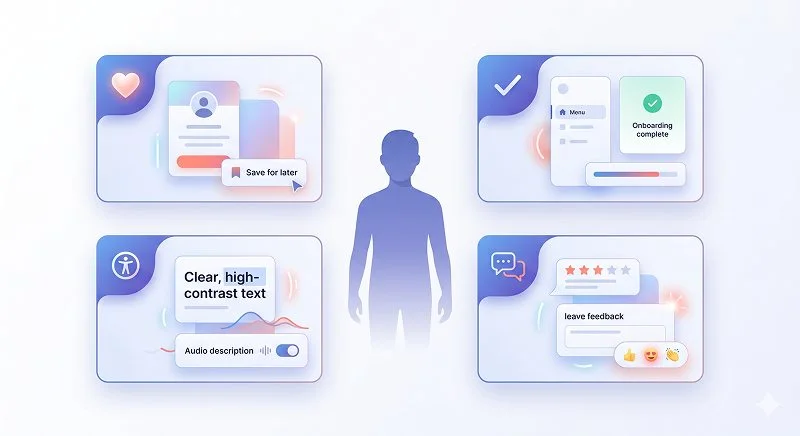
The essential elements of UCD are practical lenses you can apply to any interface, whether it’s a complex SaaS dashboard or a simple mobile form. In design reviews, I often walk through these one by one to quickly spot friction points. They translate abstract “user focus” into concrete checklist items you can evaluate.
The Essential Elements of User-Centered Design
- Visibility: Users should immediately see what the product is for, what actions are possible, and what state they are in. For example, a dashboard should clearly highlight the primary metrics or tasks instead of hiding them behind multiple clicks. In practice, poor visibility is one of the fastest ways to confuse new users and increase support tickets.
- Accessibility: People must be able to access information and actions easily, regardless of device, ability, or context. This includes clear navigation, keyboard access, adequate color contrast, and support for assistive technologies. According to accessibility guidelines (like WCAG), designing for accessibility also improves usability for everyone—think larger tap targets on mobile or descriptive labels for complex forms.
- Legibility and Clarity: Text, labels, and data must be easy to read and scan. This means using appropriate font sizes, sufficient contrast, clear hierarchy (headings, subheadings, body), and avoiding walls of text. In usability tests, I often see that simplifying labels from technical jargon to everyday words can dramatically reduce task completion time.
- Language and Tone: Use short sentences, simple vocabulary, and consistent terminology across the product. The tone should match the context: reassuring for error states, concise for instructions, and neutral for regular interactions. In my experience, rewriting microcopy (button labels, error messages, hints) is one of the cheapest, highest-impact UCD improvements you can make.
- Feedback and System Status: Users need immediate, understandable feedback when they take action—loading indicators, success messages, error explanations. Without clear feedback, people repeat actions, get frustrated, or abandon tasks entirely. This element is critical in flows like payments, form submissions, or file uploads.
Lear more about: Translating Goals Into Heart Dimensions in Digital Products
Principles of User-Centered Design
What Core Principles Guide a Good UCD Practice?
The principles of UCD are the “rules of thumb” that keep your process grounded, especially when timelines are tight or stakeholders push for shortcuts. When I review a team’s workflow, I look for these principles in action; if one is missing, quality usually suffers downstream.
Key Principles of UCD You Should Apply
- Focus on Users and Their Needs: UCD starts with a deep understanding of users—their goals, behaviors, constraints, and mental models. You gather this understanding through interviews, contextual inquiries, diary studies, and surveys. For example, interviewing customer support agents about their daily workflows often reveals pain points that analytics alone cannot show.
- Iterative Design Process: Instead of designing everything “perfectly” in one shot, UCD uses cycles of prototyping, testing, and refinement. You start with low-fidelity sketches, test them quickly, learn, and progressively increase fidelity. Research shows that catching usability issues early with low-fidelity prototypes is far cheaper than fixing them after development.
- Design for the Whole Experience and Context: UCD looks beyond individual screens to the full end-to-end journey: discovery, onboarding, daily use, error recovery, and even offboarding. It also considers the physical and social context—are users on mobile in noisy environments, or on desktop in an office? In real projects, mapping the user journey often reveals gaps between marketing promises and in-product reality.
- Involvement of Users Throughout the Process: Users are not only consulted at the beginning or the end; they are involved at multiple checkpoints. You might run early concept tests, mid-fidelity usability sessions, and post-launch feedback interviews. This continuous involvement reduces the risk of building something that looks good internally but fails in the real world.
- Use of Research and Data-Driven Decisions: UCD relies on evidence, not just opinions. Qualitative data (quotes, observations) and quantitative data (analytics, A/B test results) both inform decisions. According to industry best practices, combining both types of data gives a more complete picture: numbers tell you “what” is happening, while research explains “why”.
- Accessible and Inclusive Design: UCD aims to serve diverse users, including people with disabilities, older adults, and users with low digital literacy or limited connectivity. This means designing for screen readers, providing alternatives to complex gestures, and avoiding assumptions about prior knowledge. In many regions, accessibility is not only ethical but also a legal requirement.
The User Centered Design UCD Process Step by Step
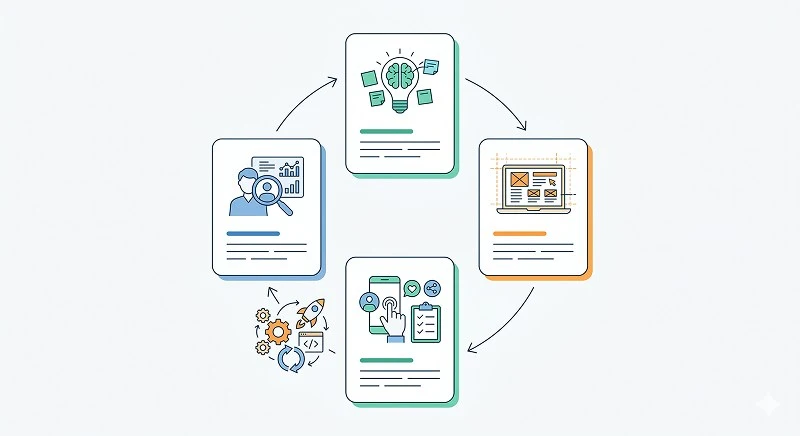
1. How Do You Start the UCD Process with Research and Understanding?
The first step in the user centered design ucd process is to understand who your users are, what they need, and in what context they interact with your product. Skipping or rushing this phase is one of the most common mistakes I see; it leads to products based on assumptions rather than reality. Your goal is to build a shared, evidence-based understanding across the team.
Core Research Activities
- User Interviews: One-on-one conversations to explore goals, frustrations, workflows, and expectations in depth. You get rich qualitative insights, direct quotes, and mental models that inform personas and journey maps.
- Surveys: Structured questionnaires to gather data from a larger sample. Surveys help you validate patterns from interviews, segment users, and prioritize which problems affect the most people.
- Contextual Observations: Watching users in their natural environment (e.g., store staff using a POS system, nurses using a medical app). This reveals workarounds, real constraints, and unspoken behaviors that users might not mention in interviews.
- Analytics and Existing Data Review: If you have an existing product, analyze funnels, drop-off points, and feature usage. This complements qualitative research and helps you focus on high-impact areas.
2. How Do You Move from Insights to Ideas in UCD?
Once you understand your users and their context, the next step is to translate those insights into design directions. In practice, this is where many teams jump straight to UI, but effective UCD takes time to clarify problems before sketching solutions.
Ideation and Concept Development
- Objective: Generate solution ideas that directly address validated user problems and align with business goals.
- Activities:
- Problem Framing Workshops: Align stakeholders on the key user problems and success metrics before ideating.
- Brainstorming and Sketching: Use methods like Crazy 8s or design studios to quickly explore multiple approaches.
- User Journey Mapping: Visualize the end-to-end experience to identify moments that matter and opportunities for improvement.
- Concept Testing with Users: Share simple storyboards or concept descriptions with users to check if ideas resonate before investing in detailed design.
3. How Do You Translate Concepts into Tangible Designs?
After you narrow down promising concepts, you need to make them concrete enough to discuss, critique, and test. This is where wireframes and mockups come in.
Creating Wireframes and Mockups
- Objective: Visualize structure, layout, navigation, and content hierarchy without getting stuck on details like final colors or illustrations.
- Activities:
- Low-Fidelity Wireframes: Simple, often grayscale layouts that show information structure and interaction patterns. These are fast to iterate and ideal for early feedback.
- Mid/High-Fidelity Mockups: More detailed designs that introduce typography, spacing, and basic visual language. These help stakeholders and users better imagine the final experience.
- Design Systems and Patterns: Start capturing reusable components (buttons, form fields, modals) to ensure consistency and speed up later work.
4. How Do You Prototype and Test in a UCD Workflow?
The next step in the user centered design ucd process is to build interactive versions of your designs and validate them with real users. This is where you see whether your ideas actually work in practice.
Prototyping and Testing
- Objective: Simulate real interactions so you can observe how users understand, navigate, and complete tasks, then refine based on evidence.
- Activities:
- Clickable Prototypes: Use tools like Figma, Sketch, or Axure to link screens into realistic flows without writing production code.
- Usability Testing Sessions: Ask participants to complete representative tasks while thinking aloud. You note where they hesitate, misunderstand, or fail.
- A/B Testing (for Live Products): Test different design variants with real traffic to measure impact on key metrics (conversion, completion rate, time on task).
- Iteration Cycles: After each test round, prioritize issues, make changes, and test again. Short, focused cycles are more effective than big-bang redesigns.
5. How Do You Integrate UCD into Development and Post-Launch?
UCD does not stop when development begins or when you ship version 1. In mature teams, user-centered thinking continues throughout implementation and beyond.
Implementation and Continuous Improvement
- Design–Dev Collaboration: Designers, developers, and product managers work closely to preserve user experience quality during implementation. Regular check-ins and shared documentation (design specs, interaction guidelines) reduce misinterpretation.
- Accessibility and QA Reviews: Test with assistive technologies, run accessibility audits, and conduct cross-device QA to ensure the experience works for all users.
- Post-Launch Monitoring and Feedback Loops: Track behavior with analytics, collect in-product feedback, and schedule follow-up interviews. According to industry benchmarks, continuous discovery and iteration are key differentiators of high-performing product teams.
Learn more about: What Colors Easily Manipulate Poeple
Best Practices and Challenges for the UCD Process
What Best Practices Make the UCD Process Work in Real Teams?
To make the user centered design ucd process sustainable, you need habits and structures that survive deadlines and organizational changes. Over multiple projects, a few practices consistently stand out.
Best Practices
- Start Small but Consistent: Even 5–7 user interviews per release cycle can dramatically improve decisions. Consistency beats occasional “big” research projects.
- Make Findings Visible: Share user quotes, journey maps, and recordings with the team. When stakeholders hear users directly, buy-in for UCD grows.
- Tie UCD to Business Metrics: Connect UX improvements to KPIs like conversion, retention, or support ticket volume. This helps justify time spent on research and testing.
- Document Decisions and Rationale: Capture why you chose certain patterns or flows, referencing research. This prevents re-arguing old decisions and helps onboard new team members.
What Common Challenges Should You Expect?
Implementing UCD is powerful but not always easy. Recognizing typical obstacles helps you plan around them.
Common Challenges
- Limited Time and Budget: Teams often feel they “don’t have time” for research. In reality, skipping it usually leads to costly rework. Start with lightweight methods and integrate them into existing sprints.
- Stakeholder Resistance: Some decision-makers prefer intuition or past experience over new user data. Sharing quick wins from small tests often helps shift this mindset.
- Recruiting the Right Users: Finding representative participants can be hard, especially in B2B or specialized domains. Partner with sales, support, or customer success to access real users.
- Over-Reliance on One Data Type: Only using analytics or only using interviews can skew decisions. Aim for a balanced mix of qualitative and quantitative evidence.